Aqara Presence Sensor FP2 – Global Edition
$139.00
A Wi-Fi presence sensor that uses 60 GHz radar to split a room into as many as 30 trackable zones, letting lights, fans, and aircon respond to exactly where you are instead of just whether the room is occupied.
Description
The Aqara Presence Sensor FP2 is a Wi-Fi 2.4 GHz mmWave radar presence sensor that detects exactly where people are in a room — not just whether something moved. Using 60 GHz radar plus a built-in light sensor, the FP2 covers up to 40 m² (≈430 ft²), divides that space into up to 30 customisable zones, and tracks multiple people simultaneously. It connects directly over 2.4 GHz Wi-Fi with no Aqara hub required, and exposes each zone as a separate occupancy sensor in Apple Home, Amazon Alexa, Google Home, IFTTT and Home Assistant. Sold by PassionHome — your Authorised Aqara Dealer in Singapore — with local availability, official 24-month Aqara warranty, and Singapore-based service through the Aqara Service Center at Tai Seng.
Why buy the FP2 in Singapore
- Singapore voltage and plug-ready. The FP2 ships with a USB-C-to-USB-A cable and runs on 5 V DC / 1 A — pair it with any standard 220–240 VAC USB charger you already own.
- Ceiling or wall mounting with a magnetic base. The included magnetic adjustable stand lets you ceiling-mount for full radial coverage or wall-mount for directional zones. Perfect for HDB false ceilings, condo soffits, plasterboard walls, or open-concept layouts.
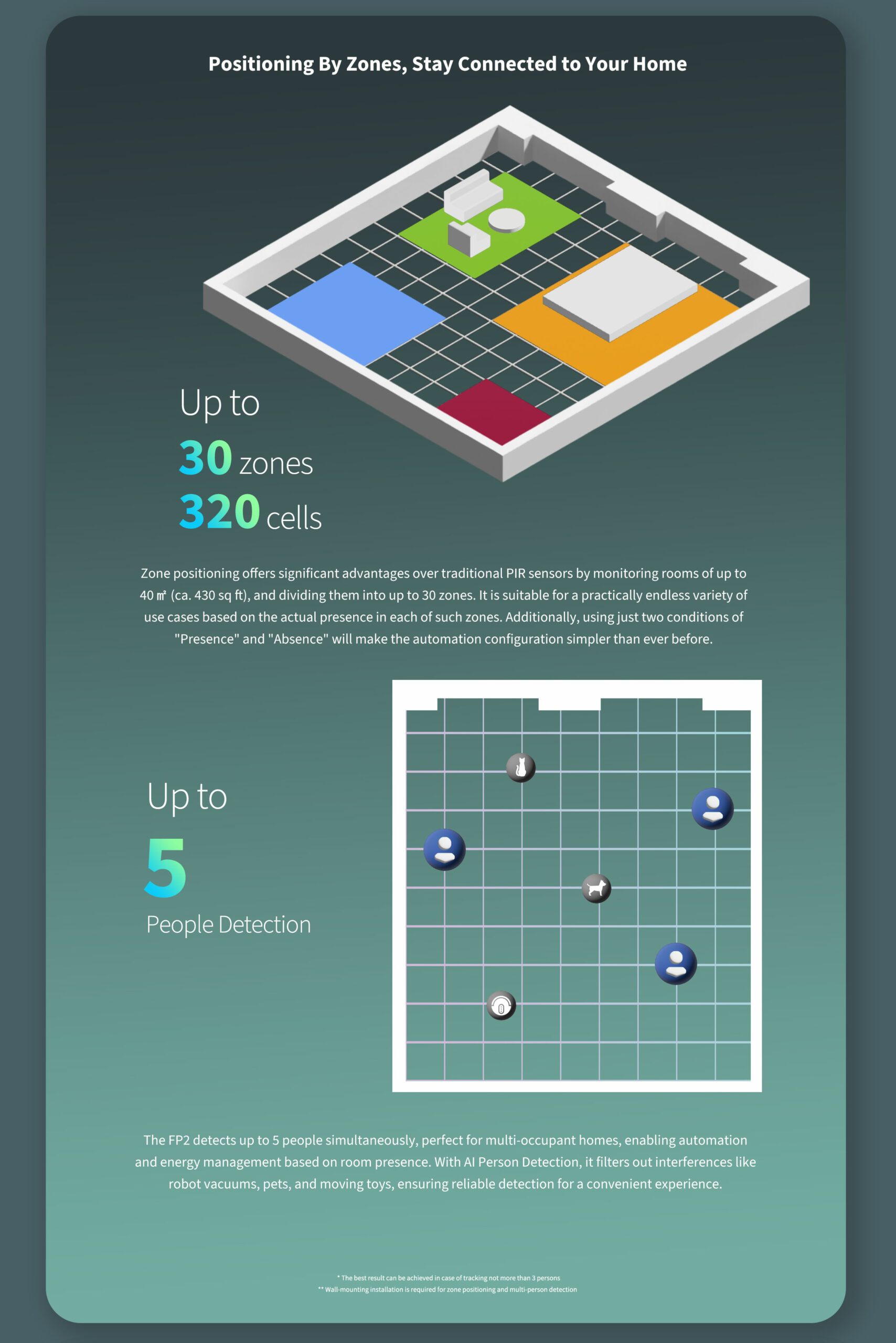
- Multi-zone tracking that rewrites your automations. Up to 30 customisable zones across 320 positional cells means one FP2 replaces 4–6 PIR motion sensors. Lights, fans, aircons and shades can each respond to a specific corner of the room rather than the whole room at once.
- Splash-resistant IPX5 — bathroom-safe and sheltered-outdoor capable. Aqara explicitly states the FP2 “can also be installed in humid environments such as bathrooms and even outdoors under a roof”. The supplied wall plug and USB charger are not IP-rated, so the power chain must stay in a dry zone — but the FP2 sensor itself tolerates the splashes and humidity of a typical Singapore bathroom or covered balcony.
- Authorised Aqara Dealer + 24-month warranty serviced in Singapore. PassionHome.sg is on Aqara’s official Singapore partner network; warranty service at the Aqara Service Center, Tai Seng. Estate group-buy pricing available — see active group-buys.
Multi-zone radar presence detection
Up to 30 customisable zones — 320 positional cells
The FP2 maps your room as a positional grid of 320 cells and lets you draw up to 30 named zones on top of that grid. Sofa, study desk, dining table, bathroom door, hallway entrance — each becomes a discrete trigger. Per-zone automations replace the all-or-nothing logic of single-output PIR sensors: turn on the desk lamp only when someone enters the study-desk zone; keep the living-room lights on only when the sofa zone is occupied; trigger the bathroom exhaust fan only when someone enters the bathroom zone.
Detection range and field of view
When wall-mounted, the FP2’s horizontal detection angle is 120° and the radial distance is up to 8 metres. When ceiling-mounted at a height of 2.8 metres, it covers a radius of 2 metres. Total coverage area: up to 40 m² (≈430 ft²) per sensor. That’s enough for the typical Singapore HDB or condo living-and-dining open-plan layout from a single ceiling-mounted unit, or an entire bedroom plus the en-suite bathroom from a wall-mounted unit positioned at the right corner.
Multi-target tracking — up to 5 people simultaneously
The FP2 tracks up to 5 people in the field of view at the same time. Aqara notes that positional accuracy is best when 3 or fewer people are in the field of view — beyond that, presence is still detected reliably but per-zone tracking can become less precise. For most home scenarios (couple + child, two roommates, family of four) this is more than enough; large family-room gatherings still trigger zone-based automations consistently.
Distinguishes presence from motion — and from interference
The 60 GHz mmWave radar detects subtle body movements like breathing and small posture shifts, so the FP2 maintains an accurate “present” state even when a person is sitting still, reading, or sleeping. To eliminate false positives, Aqara recommends marking interference sources (curtains, fans, hanging plants, running water) and setting room edges and entrance/exit areas in the Aqara Home app — the radar then ignores movement signals from those flagged areas and focuses on real human presence.
Three operating modes — zone detection, sleep monitoring, fall detection
The FP2 supports three distinct sensing modes that cannot run simultaneously:
- Zone Detection (default). Multi-zone presence + zone-based automation triggers; the everyday mode for most rooms.
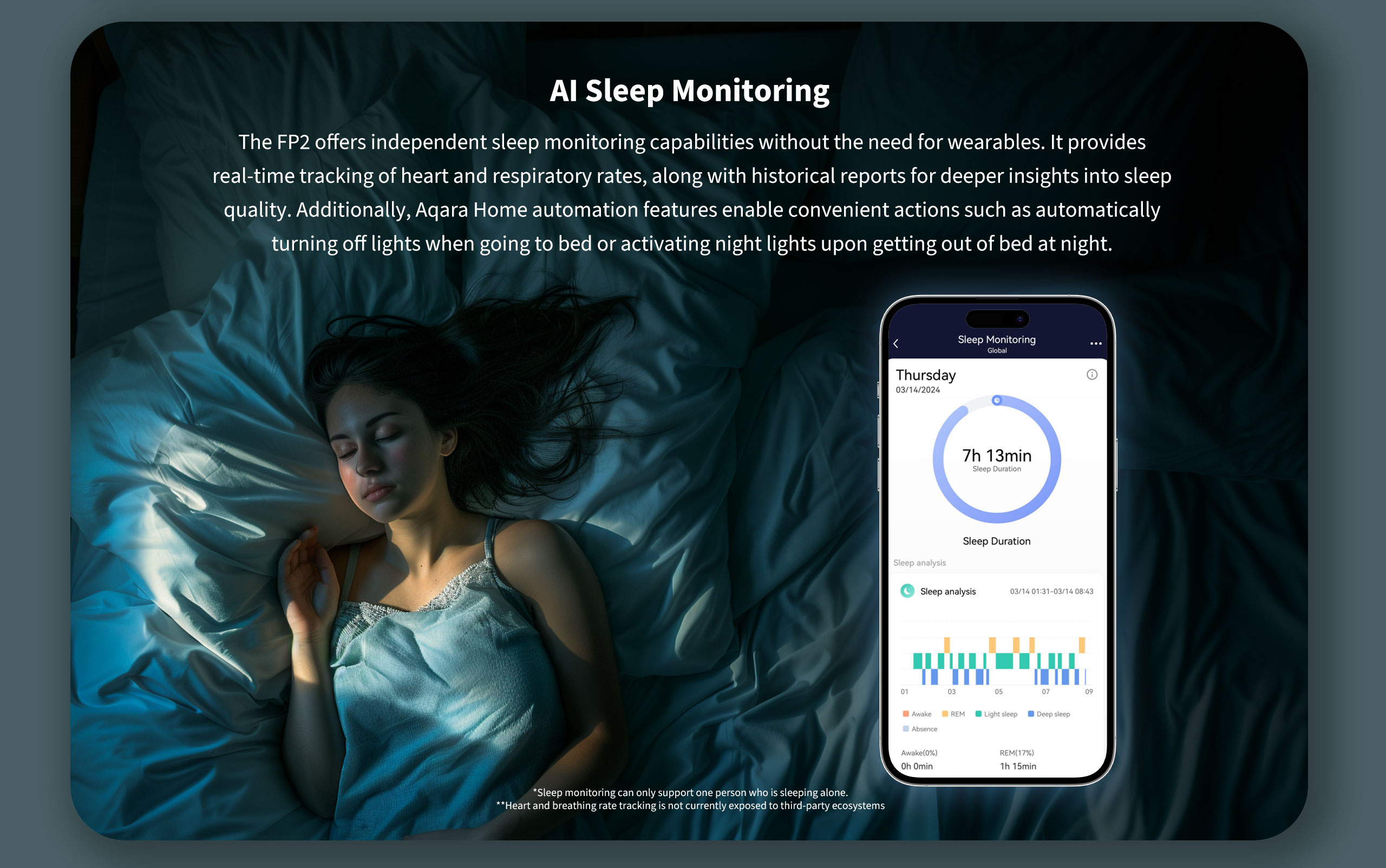
- Sleep Monitoring (beta, single-person). Tracks chest movement to assess sleep quality, breath rate, and heart-rate variability over the night. Designed for single-person monitoring; for couples, install one FP2 per side of the bed and set discrete sleep zones. Note: the FP2 is not a medical device — heart-rate and sleep readings should not be used for diagnosing or preventing sleep-related disorders.
- Fall Detection (ceiling mount only). Detects sudden vertical-to-horizontal posture changes and reports fall events. Useful for elderly-care scenarios. Aqara explicitly notes that fall detection serves as an auxiliary function and cannot identify 100% of falls — it is affected by usage conditions, installation location, and environmental factors. Not a substitute for emergency-response medical devices.
Smart home connectivity — Wi-Fi, no hub needed
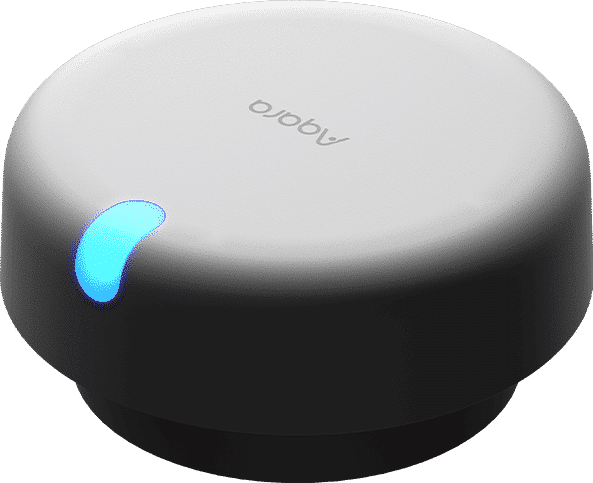
Direct 2.4 GHz Wi-Fi pairing — no Aqara hub required
The FP2 pairs directly to your home 2.4 GHz Wi-Fi network — no Aqara hub, no Zigbee coordinator, no Thread border router required. Bluetooth 4.2 is used only during initial setup to hand off your Wi-Fi credentials. The FP2 needs a 2.4 GHz network band (it does not support 5 GHz), and Wi-Fi names and passwords should avoid special characters. For local automation execution (without depending on Aqara’s cloud), pair the FP2 to an Aqara hub running firmware 3.5.0 or above that supports Wi-Fi local automation. Both the Aqara Hub M3 and Aqara Hub M200 meet that requirement.
Apple HomeKit — full-fat support, no hub needed for pairing
Once paired in Aqara Home, enable the HomeKit bridge inside the app and scan the HomeKit setup code on the back of the device. Every zone you draw appears as its own occupancy sensor in the Apple Home app, and the built-in lux reading appears as a light sensor. No HomePod, Apple TV, or Aqara hub is required as a HomeKit bridge — the FP2 acts as its own native HomeKit accessory over your home Wi-Fi.
Pairing notes: your phone and the FP2 must be on the same 2.4 GHz (or mixed-band) Wi-Fi network during HomeKit setup. If you have an Apple home hub (HomePod, Apple TV, iPad in Hub mode), all three — phone, FP2, and hub — must share the same local network. For localised control of FP2 from HomeKit (no cloud round-trip), this same-network requirement is permanent. Error code 74 in Apple Home usually means the home hub is offline or on a different network.
Alexa, Google Home, IFTTT, Home Assistant
The FP2 surfaces its multi-zone presence + lux readings to Amazon Alexa and Google Home via the Aqara Home cloud skill. Alexa setup: enable the “Aqara” skill in the Alexa app, log in with your Aqara account, and run device discovery — the FP2 zones appear automatically. IFTTT exposes both the Multi-Zone Presence channel and the Light channel, enabling cross-service triggers (e.g. trigger a Philips Hue scene when a specific FP2 zone reports occupancy).
For Home Assistant, Aqara documents two paths: (a) the official Aqara Home Assistant add-on (cloud-routed), or (b) Home Assistant’s built-in HomeKit Controller integration (fully local, after un-pairing the FP2 from Apple Home). Path (b) is the preferred choice for HA users who want local control without cloud dependency — every zone surfaces as a discrete entity. Yandex Alice support is limited to the Light channel only; multi-zone presence is NOT exposed in Yandex Alice. Samsung SmartThings is NOT in Aqara’s official FP2 ecosystem list — for SmartThings households, the FP300 (Matter-over-Thread native, SmartThings-compatible) is the recommended Aqara presence-sensor alternative.
Matter support
The FP2 is NOT a Matter-native device at the time of writing. Aqara’s official FP2 product page lists Apple Home, Amazon Alexa, Google Home, IFTTT, Yandex Alice (Light channel only) and Home Assistant — but not Matter. If you need a Matter-native presence sensor, choose the Aqara Presence Sensor FP300 (Matter-over-Thread native, no hub required for Matter pairing) — Aqara explicitly directs Matter-native buyers to the FP300. You can still bridge the FP2 into a Matter fabric via Apple Home (HomeKit-paired FP2 surfaces as Matter-bridged via the Apple home hub) or via an Aqara Matter-capable hub such as the Aqara Hub M3.
Aqara Home — automation builder and local execution
In Aqara Home, the FP2 unlocks the full feature set: draw and name zones, tune detection sensitivity per zone, mark interference sources / room edges / entrance-and-exit areas, set absence-delay timing, switch between Zone Detection / Sleep Monitoring / Fall Detection modes, and run local automations with other Aqara devices or HomeKit-compatible Wi-Fi devices on the same network. Setting up zone-based automations: open Aqara Home → Automation → Add Automation → “When” select Presence Sensor FP2 → Area Detection → Area Entry → “Then” select the action (e.g. Light → On). Approaching automations (trigger when someone approaches a zone from 1 m / 2 m / 3 m away) are configured the same way.
Ambient light and occupancy-aware automations
Built-in lux sensor
The FP2 includes a built-in ambient-light sensor that reports illuminance (lux) to your ecosystem as a discrete light-sensor entity. In Apple Home, it shows as a Light Sensor accessory; in Aqara Home, the lux reading feeds automation conditions; in IFTTT, the Light channel is exposed alongside Multi-Zone Presence. The lux sensor is what makes lights-only-when-needed automations practical — combine presence + ambient-light thresholds so the lights come on only when someone enters the room AND the daylight has dropped below a useful threshold.
Lights-only-when-needed scenes
Combine the FP2’s per-zone presence with its lux reading for genuinely-adaptive lighting. Example automations:
- Study desk: IF the study-desk zone is occupied AND lux at desk < 300 THEN turn on the desk lamp
- Open-plan living-dining: IF the sofa zone is occupied THEN raise the ceiling-light dim level by 30%; IF the dining zone is occupied THEN switch the dining pendant to scene “dinner”
- Bedroom: IF the bed zone is occupied AND it’s between 23:00–06:00 THEN dim the bedside lamp to 5%; IF no zone is occupied for 5 minutes THEN turn off all room lights
- Bathroom: IF the bathroom-door zone is entered THEN turn on the bathroom exhaust fan and ceiling light; IF no presence in the bathroom for 2 minutes THEN turn the fan off (G34 group-buy framing — significant discount when your estate unlocks)
Sleep and fall detection — wellbeing automations
In Sleep Monitoring mode, the FP2 generates nightly sleep reports — sleep onset, wake events, total sleep duration, micro-movement frequency. Combine these with bedside-light + AC automations (e.g. AC drops to “sleep” curve when sleep is detected; gentle bedside-light fade-in at the configured alarm time). In Fall Detection mode (ceiling-mount only), the FP2 sends an alert to your Aqara Home app and any paired ecosystems when a fall event is detected — useful for elderly-care setups. Both modes are mutually exclusive with Zone Detection and each other; switch via the Aqara Home app per the documented mode-switch procedure. Sleep readings should be treated as informational only — the FP2 is not a medical device.
Mounting and placement in Singapore homes
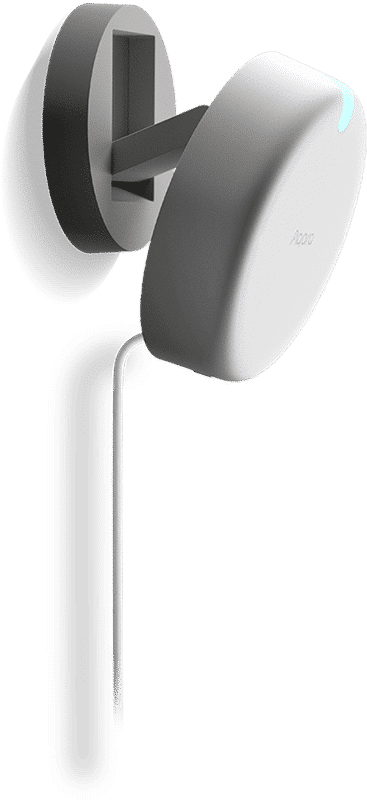
Ceiling versus wall — coverage trade-offs
Aqara’s spec confirms both mounting orientations:
- Wall mount: 120° horizontal detection angle, up to 8 m radial distance, with the device tilted 20° up/down. Best for directional zone-tracking — bedrooms, study rooms, hallways, anything where you want to detect “who’s where” along a wall-aligned axis.
- Ceiling mount: at a 2.8 m mounting height, covers a 2 m radius (≈12 m² area). Best for compact spaces — bathroom, dining nook, small bedroom — and for fall detection (which requires ceiling mounting).
Keep the FP2’s logo level when mounting on a wall — if it’s tilted too high or too low, the detection cone shifts and you’ll get false triggers or missed detections. The included magnetic adjustable stand snaps onto a metal mounting plate (kit-dependent — PS-S02D global ships 2 plates + 2 stickers; PS-S02E EU ships 1 of each), so fine angle adjustment is quick.
HDB and condo ceiling considerations
Singapore HDB false ceilings (typically 2.4–2.7 m for living rooms; 2.7–3 m for newer condo soffits) work well within the FP2’s 2.8 m optimal ceiling-mount height. For taller ceilings (some condo doubled-height living rooms, landed properties), wall-mount the FP2 at about 2 m and angle it down — the 120° field of view and 8 m radial range cover most large-area scenarios from a corner position. The fully-rotatable magnetic base makes corner mounting straightforward.
Avoid installing the FP2 near air-conditioner vents, ceiling fans, moving curtains, or running water — these can mimic micro-movement signals and trigger false positives. If you can’t avoid those locations, mark them as interference sources in Aqara Home (the radar will then ignore movement signals from the flagged areas). After the FP2 is installed and powered on, run a “Space Intelligent Learning” session when no one is present — this eliminates environmental background noise interference and dramatically improves accuracy for the first few days.
USB-C power — extension and routing
The FP2 runs on USB-C 5 V / 1 A and ships with a USB-C-to-USB-A cable. Any standard 220–240 VAC USB charger you already own (phone wall plug, tablet charger, USB power bank) powers the FP2 reliably. The supplied wall plug and USB charger are not IP-rated, so for installations in bathrooms or sheltered outdoor positions, route the cable from the dry zone (where the wall plug sits) through to the FP2’s mounting point. A 5 V / 1 A USB charger is not included — most households already own a spare phone charger that works perfectly. If you need one, ask at checkout and we’ll add a low-profile USB-C charger to your order at cost.
Bathroom, balcony, and “outdoors under a roof”
Aqara explicitly states the FP2 “can also be installed in humid environments such as bathrooms and even outdoors under a roof”. The sensor itself is rated IPX5 (splash-resistant). In Singapore, that translates to:
- Bathroom — yes, for occupancy-driven exhaust-fan and lighting automations; keep the wall plug + USB cable in a dry zone outside the splash perimeter
- Covered balcony / under-roof porch — yes, as long as both the FP2 and the power chain (wall plug + USB cable) stay sheltered from direct rain
- Unsheltered outdoor — no, the FP2 is not fully weatherproof; direct rain or sustained wet exposure will damage it, and the wall plug is unrated for outdoor use
- Operating temperature range: −10 °C to 40 °C — well within Singapore’s year-round 24–32 °C indoor / 26–34 °C sheltered-outdoor range
Specifications (FP2)
| Product name | Aqara Presence Sensor FP2 |
| Model number | PS-S02D (global) / PS-S02E (EU) — PassionHome ships PS-S02D |
| Dimensions | 64 × 64 × 29.5 mm (2.52 × 2.52 × 1.16 in) |
| Detection technology | 60 GHz millimetre-wave (mmWave) radar + ambient-light sensor |
| Coverage area | Up to 40 m² (≈430 ft²) per sensor |
| Zone positioning | Up to 30 customisable zones across 320 positional cells |
| Multi-target tracking | Up to 5 people simultaneously (best results with ≤ 3 people in field of view) |
| Detection angle | 120° horizontal, 20° up/down (wall-mount); 360° radial (ceiling-mount) |
| Wall-mount distance | Up to 8 m radial |
| Ceiling-mount coverage | 2 m radius at 2.8 m mounting height |
| Radar operation frequency | 60–64 GHz |
| Wireless protocols | Wi-Fi IEEE 802.11 b/g/n 2.4 GHz; Bluetooth 4.2 (setup only) |
| Wi-Fi operation frequency | 2412–2472 MHz |
| Hub required | No — connects directly to your home Wi-Fi (local automation needs Aqara hub fw 3.5.0+) |
| Third-party ecosystems | Apple Home (HomeKit) — full multi-zone; Amazon Alexa — multi-zone via Aqara skill; Google Home — multi-zone via Aqara skill; IFTTT — multi-zone + light; Yandex Alice — light sensor channel only; Home Assistant — via Aqara HA add-on or HomeKit Controller |
| Matter support | Not currently — bridge via Apple Home or an Aqara Matter-capable hub |
| Power input | 5 V DC, 1 A, USB-C |
| Mounting | Ceiling or wall, magnetic adjustable stand (included) |
| Operating temperature | −10 °C to 40 °C (14 °F to 104 °F) |
| Operating humidity | 0–95% RH, non-condensing |
| Protection rating | IPX5 (splash-resistant; suitable for humid environments such as bathrooms and sheltered outdoor placements under a roof — supplied wall plug and adapter are not IP-rated) |
| Local automation | Yes — with other Aqara or Apple Home-compatible devices, via Aqara hub fw 3.5.0+ |
| Special features | 30 zones; multi-target tracking (up to 5); approach-and-leave detection at 1 m / 2 m / 3 m thresholds; sleep monitoring (beta, single-person); fall detection (ceiling mount); space intelligent learning |
| Warranty | 24 months from purchase, serviced at the Aqara Service Center, Tai Seng (Singapore) |
What’s in the box
- 1 × Aqara Presence Sensor FP2 (PS-S02D — the global kit PassionHome ships)
- 1 × USB-C to USB-A cable
- 2 × Magnetic mounting plate (metal)
- 2 × Adhesive sticker
- 1 × Screw kit
- 1 × User manual / quick-start guide
A 5 V / 1 A USB charger is not included — most households already own a spare phone charger that works perfectly. If you need one, ask us at checkout and we’ll add a low-profile USB-C charger to your order at cost.
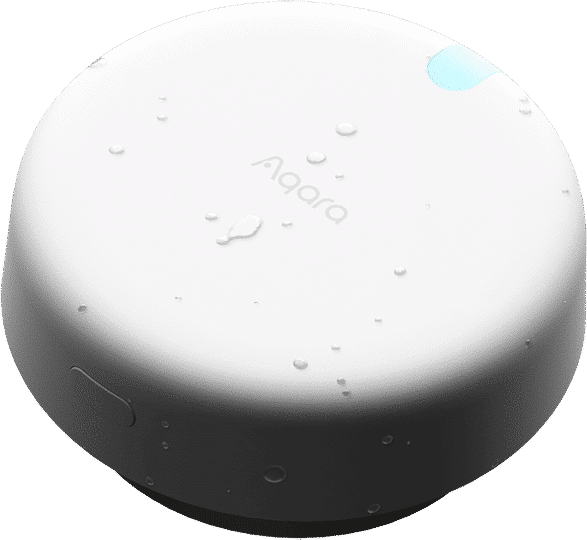
FP2 vs FP300 — which Aqara presence sensor is right for you?
| FP2 (this product) | FP300 | |
| Best for | Multi-zone automations, sleep monitoring, fall detection — mains-powered scenarios | Battery-powered placement, environmental sensing (temp + humidity + light) |
| Detection | 60 GHz mmWave radar + ambient light sensor | PIR + 60 GHz mmWave + ambient light + temperature + humidity |
| Coverage | Up to 40 m² area; up to 30 customisable zones | 6 m radial range, single zone, 120° field of view |
| Multi-target tracking | Up to 5 people simultaneously | Single-target presence |
| Wireless | Wi-Fi 2.4 GHz (direct — no hub required) | Thread / Matter (direct) or Zigbee 3.0 (Aqara hub required for Zigbee mode) |
| Power | USB-C, mains-powered | 2 × CR2450 batteries, up to 3 years (Zigbee mode) |
| Matter support | Not currently — bridge via Apple Home or Aqara hub | Native Matter-over-Thread (Apple Home, Google Home, Alexa, SmartThings, Home Assistant, Homey) |
| Fall detection | Yes (ceiling mount only) | No |
| Sleep monitoring | Yes (beta, single-person) | No |
| IP rating | IPX5 — bathroom + sheltered outdoor under a roof | Indoor placement only (no IP rating; humidity non-condensing) |
Warranty and authorised-dealer details
Every Aqara product sold by PassionHome.sg is genuine, Singapore-spec stock backed by Aqara’s official local warranty. As an Authorised Aqara Dealer on Aqara’s official Singapore partner network, our FP2 units:
- Are sourced direct from Aqara distribution channels — never grey-market or parallel-imported
- Are covered by Singapore-based warranty service through the Aqara Service Center at Tai Seng — no overseas RMA required
- Receive Aqara firmware updates via the standard Aqara Home OTA channel
Warranty term: 24 months from purchase date. PassionHome.sg can guide you through the warranty process; reach out via WhatsApp +65 9051 7063.
Frequently asked questions
What can the Presence Sensor FP2 do?
The FP2 detects presence and absence, falls, events of someone entering, leaving, approaching, and going away, and ambient illuminance. It supports real-time tracking of multiple targets and customisable zone settings — all over your home 2.4 GHz Wi-Fi network with no Aqara hub required.
Can the FP2 support multi-person detection?
Yes — the FP2 tracks up to 5 targets simultaneously. The best per-target accuracy is achieved when tracking 3 or fewer people in the field of view at once. Beyond 3 people, occupancy is still detected reliably but per-zone tracking can become less precise.
What is a detection zone, and how many zones can I set?
A detection zone is a named area on the FP2’s positional grid that drives zone-based automations. The FP2 maps your room as a grid of 320 cells; you can select cells to define areas such as the sofa, bathroom, study, or dining table. You can create up to 30 zones per FP2, and each zone becomes available as an automation condition.
What is the use of the interference source, entrance/exit, and edge settings?
The FP2 uses millimetre-wave radar, which is sensitive to moving objects. More complete room configuration means more accurate detection. Interference sources flag objects with smaller emission signals (plants, running water). Edges counteract false targets caused by wall reflections. Entrance/Exit settings accelerate target creation and deletion when people enter or leave.
What is the button on the FP2 used for?
The button is used for device resetting. Press and hold for 10 seconds to reset the network configuration. Press quickly 10 times to restore factory settings.
How do I add the FP2 to Aqara Home?
Open Aqara Home, tap “Home”, tap “+” in the upper right, select “Add accessory”, and search for “Presence Sensor FP2”. The FP2 enters pairing mode automatically when first powered on; Bluetooth 4.2 hands off your 2.4 GHz Wi-Fi credentials to the sensor.
Does the FP2 support local automation?
Yes, but it requires an Aqara hub running firmware 3.5.0 or above that supports Wi-Fi local automation. The Aqara Hub M3 and Aqara Hub M200 both meet this requirement.
What is the proper distance between the FP2 and an Aqara hub? Can detection penetrate walls?
In home environments, the recommended distance between the FP2 and a paired Aqara hub is no more than 20 metres, with no more than two walls between them. The FP2’s radar itself cannot penetrate walls — 60 GHz mmWave is absorbed by typical concrete, plasterboard, glass, and brick. The FP2 is a single-room sensor.
How do I verify the FP2 is installed in a good position?
Three checks. The device homepage in Aqara Home should show a person-icon whose motion follows yours; absence detection should fire within 30 seconds of leaving the area; and avoid moving objects in the FP2’s field of view for a short period after install to confirm no false alarms.
Why does the FP2 sometimes go offline?
The FP2 may be too far from your Wi-Fi router, or there are metal obstacles between them. Move the FP2 closer to the router (the FP2 is 2.4 GHz only — 5 GHz networks won’t work), and keep firmware up to date for the latest connectivity stability fixes.
How do I set up automation based on zone detection?
In Aqara Home, tap Automation → Add Automation → add trigger device in “When” → add execution device in “Then”. For zone-based automations, select Presence Sensor FP2 → Area Detection → Area Entry (choose your zone) in “When”, then the action in “Then” (e.g. Light → On).
What is the detection range of the FP2?
Wall-mounted: 120° horizontal angle, up to 8 m radial distance, 20° vertical up/down tilt. Ceiling-mounted at 2.8 m: 2 m radius (≈12 m²). Maximum coverage area: up to 40 m² per sensor.
What is approaching automation, and what is the distance setting for?
The FP2 detects when someone approaches the sensor or a specific zone, then triggers an automation (e.g. turn on the light when approaching the sofa zone). Three distance levels are available: 1 m, 2 m, and 3 m. Entering the threshold triggers an approaching event; leaving triggers a going-away event.
How does Left-Right Detection mode differ from Default mode?
Default (non-directional) monitoring detects presence within the sensing range. Left-right monitoring detects movement direction on both sides — useful for distinguishing entering from exiting in hallway/door scenarios. Default mode is recommended unless you specifically need directional detection.
How do I improve zone-detection accuracy?
Aqara’s documented checks: choose a location away from glass, mirrors, metals, water, AC vents, fans, and moving curtains; mount the FP2 with logo level; define max detection range and edges; set entrance/exit areas; mark interference sources; tune sensitivity per zone; run Space Intelligent Learning when no one is present; enable AI High-Precision Human Recognition to filter out pets and robot vacuums.
What are the precautions for adding the FP2 to Apple Home?
Phone and Apple home hub (e.g. HomePod) must be on the same local network; phone on 2.4 GHz or mixed-band Wi-Fi. Scan the HomeKit QR code on the back of the FP2. Zone settings sync from Aqara Home to Apple Home. Error Code 74 means the Apple home hub is offline or on a different network.
Can I use sleep monitoring, zone detection, and fall detection modes simultaneously?
No — these 3 modes cannot run simultaneously. Switch between them in the Aqara Home app per the on-screen guidance.
How can I improve sleep-report accuracy?
Adjust the sleep monitoring area to match your bed location; reduce interference sources (AC, fans, curtains); run a Sleep Space Intelligent Learning session when no one is present; tune presence detection sensitivity; sleep monitoring is single-person only — for two people set the bed area on one side of the target.
Can the FP2 monitor sleep for two people?
Sleep monitoring is designed for single-person monitoring. To monitor two people, install separate FP2 units and set distinct sleeping areas for each (one FP2 on each side of the bed).
Will a thick blanket disrupt the accuracy of sleep monitoring?
No. The 60 GHz mmWave radar penetrates fabric and detects subtle body movements like breathing through normal bedding. The FP2’s AI assesses sleep based on movement, heart-rate variability, and breathing-rate signals.
Does mmWave radar monitoring have any health impact?
No. mmWave radar operates at frequencies that comply with established human safety standards. The FP2’s emissions are significantly lower than harmful thresholds and lower than the radiation from a typical mobile phone (which is itself generally considered safe).
Will multiple FP2 units in the same room interfere with each other?
Generally no — multiple FP2 units in the same space won’t interfere if they are not directly facing each other (their detection cones don’t overlap head-on). Simultaneous operation in various modes across a large room is supported.
How is the FP2’s heart-rate reading consistent with a fitness watch?
The FP2 uses radar to detect chest movements and heartbeat fluctuations. Readings may differ from professional medical equipment. The FP2 accurately measures respiration and heart rates under static conditions only and is not suitable during motion. The FP2 is not a medical device — for medical guidance consult a healthcare professional.
Why can’t I configure per-zone sensitivity after enabling AI High-Precision Human Recognition?
AI Human Recognition requires “high” sensitivity to distinguish humans from pets and robot vacuums. When enabled, sensitivity is automatically set to high across all zones and individual zone sensitivity adjustments are disabled by design.
Can fall detection identify all types of falls?
No. Fall detection is an auxiliary function and cannot identify 100% of falls. Accuracy is affected by usage conditions, installation location, environmental factors, software version, and hardware individual variability. The FP2 is not a medical device — treat fall-detection alerts as supplementary safety signals only.
The FP2 fails to connect to Wi-Fi — what should I check?
The FP2 supports 2.4 GHz Wi-Fi only — switch to a 2.4 GHz SSID or mixed-band mode if your router is 5 GHz. Avoid special characters in SSID and password. Check whether your router has Wi-Fi anti-freeze or AP isolation enabled (these can prevent the FP2 from being discovered). Bridged-connection networks are not recommended.
How do I connect the FP2 to Apple Home (HomeKit)?
Phone and FP2 must be on the same Wi-Fi. If you have an Apple home hub, all three (phone, FP2, hub) must be on the same Wi-Fi. If you see “Unable to add accessories” / “Accessories have been added” / “Accessories not found” — restart your iOS device, reset the FP2, and manually enter the HomeKit setup code.
How do I connect the FP2 to Amazon Alexa?
Set up the FP2 in Aqara Home first. Open the Alexa app → Skills & Games → search “Aqara” → enable the skill → log in with your Aqara account → run device discovery. Your FP2 zones appear automatically in the Alexa “Devices” list.
How do I connect the FP2 to Home Assistant?
Two paths: (a) Aqara’s official Home Assistant add-on (cloud-routed); (b) HomeKit Controller integration (fully local — un-pair from Apple Home first, then add via HA’s built-in HomeKit Controller). Path (b) is preferred for local control. Ensure the FP2 is on 2.4 GHz Wi-Fi without unsupported special characters in the SSID/password.
Does the FP2 support Matter?
Not at the time of writing. Aqara lists Apple Home, Amazon Alexa, Google Home, IFTTT, Yandex Alice, and Home Assistant for FP2 — not Matter. For a Matter-native presence sensor, choose the Aqara Presence Sensor FP300. You can also bridge the FP2 into a Matter fabric via Apple Home or via an Aqara Matter-capable hub such as the Aqara Hub M3.
Does the FP2 work with Samsung SmartThings?
Not directly — SmartThings is not on Aqara’s official FP2 ecosystem list. For SmartThings-centred homes, the Aqara Presence Sensor FP300 is the recommended alternative (Matter-over-Thread native, surfaces in SmartThings via Matter).
How does the FP2 work in Singapore HDB and condo flats?
Excellent fit. USB-C 5 V / 1 A — any standard 220–240 VAC USB charger powers it. The included magnetic stand mounts cleanly to HDB and condo ceilings, false ceilings, plasterboard walls, and metal stud frames. Ceiling-mount at 2.8 m for full radial coverage of an open-plan living-and-dining; wall-mount in a corner for directional zone tracking. Singapore’s 24–32 °C indoor range sits well inside the FP2’s −10 °C to 40 °C operating window.
Can I use the FP2 in a bathroom or outdoors?
Bathroom — yes. Sheltered outdoors under a roof — yes. Unsheltered outdoors — no. The FP2 is rated IPX5, and Aqara explicitly states it “can also be installed in humid environments such as bathrooms and even outdoors under a roof”. Keep the wall plug + USB cable in a dry zone; the FP2 itself tolerates splash and humidity but is not fully weatherproof.
Is there a local Singapore warranty?
Yes. 24-month manufacturer warranty serviced at the Aqara Service Center at Tai Seng (Singapore) — no overseas RMA. PassionHome.sg can guide you through the warranty process via WhatsApp +65 9051 7063. Bring the unit to Tai Seng directly; PassionHome.sg’s Ubi office is for product collection only, not warranty intake.
How is PassionHome.sg’s FP2 priced compared to other resellers?
We sell at the same MSRP as other Authorised Aqara Dealers in Singapore. The advantages are local availability, Singapore-based warranty via Tai Seng, and access to estate group-buy rates (significant discount when your estate unlocks). See active group-buys for current rounds, or contact us for bulk quotes on multi-unit renovation packages.
Related Aqara products
- Aqara Presence Sensor FP300 — battery-powered 5-in-1 wireless sensor with PIR + mmWave + ambient light + temperature + humidity. Native Matter-over-Thread (no hub for Matter pairing); compatible with SmartThings. Ideal where you can’t run USB-C power.
- FP2 Angle Mount accessory — the dedicated angle-mount adapter for installing the FP2 from a corner or ceiling. Pairs with the FP2 specifically.
- T1 Temperature & Humidity Sensor — dedicated climate sensor for richer environmental data alongside the FP2’s mmWave presence channel.
- P2 Door & Window Sensor — complementary entry-detection sensor for doors and windows; combine with FP2 zones for full whole-room automation logic.
- Aqara Hub M3 + Aqara Hub M200 — Aqara’s current flagship hubs. Either one acts as Wi-Fi local-automation engine (fw 3.5.0+) for the FP2, and as Thread Border Router + Matter Controller for adjacent Aqara devices.
- All Aqara smart sensors | Browse the full Aqara range at PassionHome | Estate group-buys